
Screenshots



Introduction
Groundd: Mindfulness Keyboard, developed by Zinkai Studios, is a unique Android application designed to integrate mindfulness and stress relief directly into your typing experience. Released in version 1.3.0, this app stands out by offering a custom keyboard that incorporates sensory grounding tools right above the keys. It aims to support users dealing with stress spikes, social anxiety, overthinking, and sensory overwhelm without requiring them to switch apps or leave conversations. Groundd combines the functionality of a standard keyboard with wellness features, creating a digital pocket fidget that helps users pause, reset, and return to the conversation seamlessly.
Graphics & Gameplay
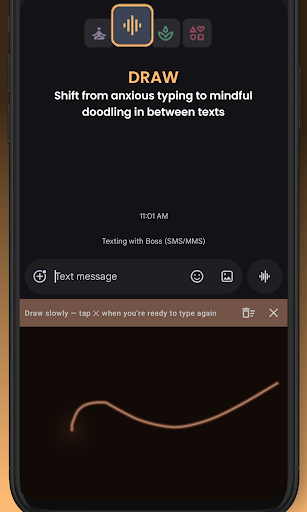
The visuals of Groundd are thoughtfully designed to be calming and user-friendly. The keyboard interface showcases a clean layout with smooth, rounded keys that are easy to navigate. The app’s wellness tools, such as the guided breathing exercises and mindful drawing canvas, feature animated elements that are visually engaging and soothing. For example, the breathing exercises use an expanding and shrinking circle to guide users through various techniques, while the Zen drawing canvas allows for freeform glowing strokes, creating a meditative experience. The graphics are complemented by haptic feedback that adds a tactile dimension to the user experience, making the app not only functional but also enjoyable to use.
Key Features
- Focus: Signal Hunt - A 30-second sensory reset exercise designed to interrupt overthinking. Users hold both thumb pads to experience random haptic pulses while counting signals, helping them regain focus before responding to messages.
- Breathe: Guided Breathing Exercises - Offers five different breathing techniques to help ground users. These techniques include simple steady breathing, box breathing, deep nervous system reset, rhythmic calm, and focused release.
- Zen: Mindful Drawing Canvas - A creative outlet for users who find words overwhelming. It includes features for freeform drawing, tracing calming shapes, and connecting stars, all designed to promote mindfulness.
- Fidget: Sensory Tactile Strip - Users can engage with various tactile sensations like bubble wrap, zipper, and clickers, allowing restless hands to fidget while remaining engaged in conversation.
- Customizable Keyboard - Groundd is not just a wellness tool but a full-featured keyboard with custom themes, key sounds, haptic feedback styles, autocorrect options, emoji support, and a clipboard manager.
- Privacy-Focused - All data processing occurs locally on the device, ensuring that user input and messages are never uploaded to any server, promoting a secure typing environment.
- 3-Day Free Trial - Users can experience all premium features for three days without any credit card details, after which the basic features remain free forever.
Mod Features
- Premium Unlocked - Enjoy lifetime access to all features including Signal Hunt, advanced breathing techniques, the complete Zen canvas, and a wider selection of fidget options without any additional costs.
- No Ads - Experience an uninterrupted typing experience free from any advertisements, allowing users to focus completely on their wellness tools and conversations.
- Unlimited Money - Gain access to an unlimited in-app currency, enabling users to customize their keyboard themes and features without limits, enhancing their overall experience.
- Offline Mode - Access all features without the need for an internet connection, making it perfect for users who may be in areas with limited connectivity.
How to Install APK on Android
Installing the Groundd app on your Android device is a straightforward process. Follow these steps:
- Enable installation from unknown sources by going to Settings > Security > Install unknown apps and allow your browser or file manager to install APK files.
- Download the Groundd APK file from a trusted source, such as the official link provided.
- Once the download is complete, locate the APK file in your device’s file manager.
- Tap on the APK file to begin the installation process.
- Follow the on-screen prompts to complete the installation.
- After installation, open the app and set Groundd as your default keyboard in the device settings.
Call to Action
If you're looking for a way to incorporate mindfulness into your daily communication, Groundd: Mindfulness Keyboard is the perfect solution. With its unique features designed for stress relief and focus, you can enhance your typing experience while managing anxiety. Download Groundd: Mindfulness Keyboard now and take the first step towards a more mindful typing experience!